Blog · Websites & Lead Systems
After-Hours Answering Service vs AI Receptionist: Which Is Best for a Small Business?
WebScaling Team · October 06, 2026 · 11 min read
Quick answer: For most small service businesses, the best after-hours setup depends on how urgent your calls are. If callers have real emergencies (burst pipes, no heat, lockouts), a live after-hours answering service or an AI receptionist with human backup is worth paying for. If most after-hours calls are quotes and bookings, an instant missed call text back plus a website chat that can book jobs often covers it for less.
Below we compare the four realistic options: voicemail, a human answering service, an AI voice receptionist, and missed call text back with website AI chat. For each one: how it works, real prices from providers' own pages, what to check before you sign up, plus a decision table.
What actually happens to your calls after hours?
Picture Sarah. Her kitchen tap starts leaking at 7:30 pm. She calls the first plumber she finds and it rings out. Many people in her position won't wait until morning: they call the next business on the list, and whoever responds first has a head start on winning the job.
So the real question isn't "should I answer after hours?" It's "what's the cheapest way to give every caller a useful response, and which calls truly need a human?"
Option 1: Voicemail
How it works: calls that aren't answered go to a recorded greeting, and the caller can leave a message. You listen to messages and call back when you're free.
Pros:
Free or included with almost every phone plan.
Fine where nobody expects an answer after hours.
Cons:
Plenty of callers hang up instead of leaving a message, so all you see is a missed call in your log.
Nothing happens until you check it. A lead from 8 pm gets a reply the next morning at best.
You can't book, qualify or reassure anyone.
Who it suits: very low call volume and no emergency work. Cost: usually nothing extra.
Tip: if you stay with voicemail, say when you'll call back ("we return all calls by 9 am") and offer a second route, like booking online.
Option 2: Human live answering service
How it works: you forward your business number to the service after hours, usually on a schedule. A trained receptionist answers in your business name, follows a script you agree, takes the details and sends you a message. Depending on the plan, they can also book appointments or transfer urgent calls to your on-call phone.
Pros:
A real person picks up. For a worried caller with water on the floor, that matters.
Good at messy, emotional or unusual calls that don't fit a script.
Can follow an emergency process, like "if there's water damage, ring the on-call engineer".
Cons:
The most expensive option, and costs rise with every call or minute.
Receptionists only know what's in your script, so detailed pricing or technical questions usually end in "someone will call you back".
Booking only works well if they can access your calendar or booking system.
Who it suits: 24/7 emergency trades (plumbers, locksmiths, heating and HVAC, restoration) and property managers, where an unanswered call at 2 am can mean real damage.
What it costs: human answering services are priced either per minute or per call, on top of a monthly plan. Two examples from the providers' own pages, at the time of writing (October 2026), in USD:
PATLive (per minute): a pay-as-you-go plan at $49/month plus $2.99 per minute, or $99/month for 50 minutes (which they estimate at about 20 calls), with extra minutes at $2.29. They say after-hours answering is included in every plan and there are no contracts.
Smith.ai human-first plans (per call): $300/month for 30 calls, then $11.50 per extra call. Some extras, like booking appointments or call recording, are charged per call on top.
Prices change, so always check the current page and ask what counts as a billable call or minute.
Option 3: AI voice receptionist
How it works: an AI voice agent answers the phone, answers common questions from information you give it (services, areas, hours, rough prices), collects the caller's details and can book into a connected calendar. You get a summary or transcript afterwards. Some providers can transfer a call to a human when the AI gets stuck.
Pros:
Every call is answered, day or night, including several at once.
Usually much cheaper per call than a human service.
Cons:
Some callers dislike talking to AI and hang up, especially older customers or people in a stressful situation.
It's only as good as its setup: wrong information leads to wrong answers, said confidently.
Emergencies need clear rules for when to get a human.
Bad lines and background noise can still trip some systems up.
Who it suits: businesses with lots of routine calls ("do you cover my area?", booking requests), such as clinics, salons, cleaning companies and busy trades.
What it costs: AI receptionists are usually priced per call or as a monthly plan with a call allowance. For example, Smith.ai's AI receptionist lists a free plan with 25 calls a month (then $3.00 per call) and a Pro plan from $150/month for 75 calls, at the time of writing (October 2026). Smith.ai says complex calls can be transferred to a live receptionist. Other providers bill per minute or per unique caller, so compare like for like.
AI disclosure: under the EU AI Act, people should be made aware when they're interacting with a machine, and the European Commission says these transparency rules come into effect in August 2026. Make sure your AI receptionist introduces itself as an AI assistant.
Option 4: Missed call text back + website AI chat and booking
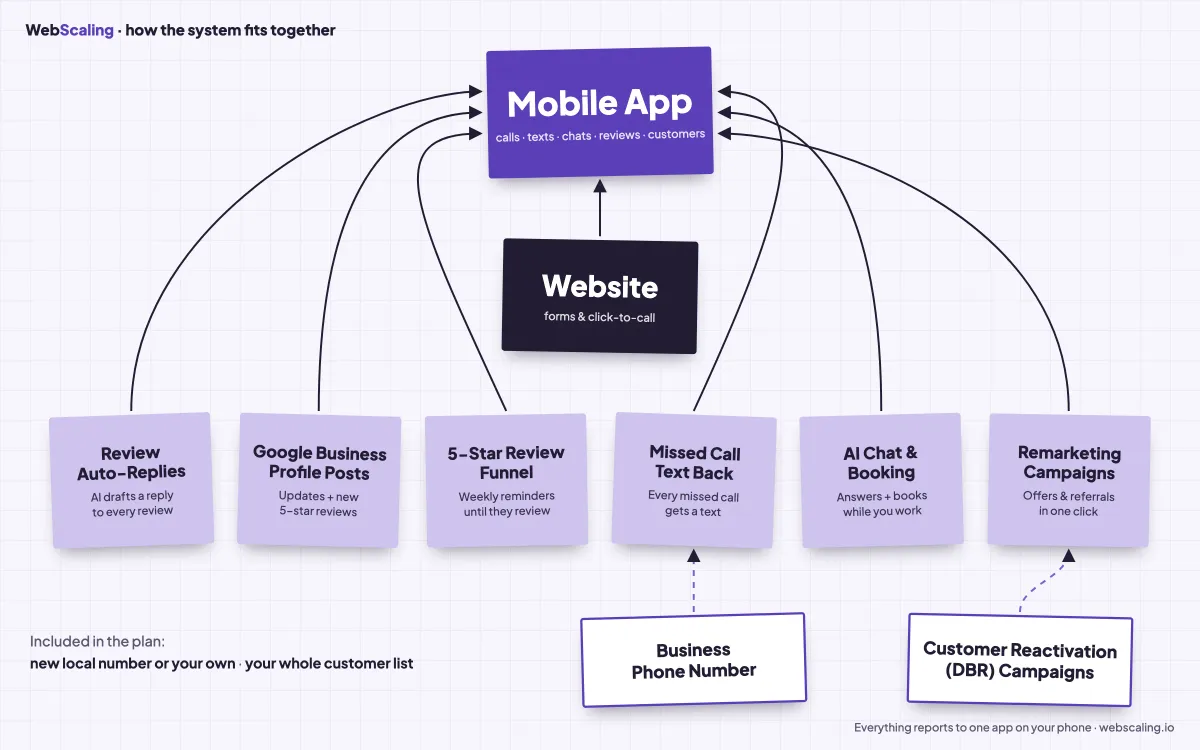
How it works: this option doesn't answer the phone. Instead, it makes sure no caller is left hanging:
A call to your business number isn't answered.
Within seconds, the caller gets an automatic text from your business number (example below).
The caller replies by text, and you answer from your phone when you can.
Meanwhile, the AI chat on your website answers questions and books appointments 24/7, and everything lands in one inbox.
Hi, this is Your Business. Sorry we missed your call! What can we help with? You can reply here or book a time: [link]
Pros:
Every missed caller gets a response straight away, even at 11 pm.
Plenty of people are happy to text, and a text thread is easy to pick up first thing in the morning.
Website visitors can book a job themselves at any hour.
Cost doesn't rise with every call the way per-minute answering does.
Cons:
Nobody speaks to the caller live. Someone in a real emergency may still call a competitor who picks up.
It only works if the caller's phone can receive texts. Landline callers won't see it.
Someone still has to reply. Automation starts the conversation; you finish it.
Who it suits: quote-based and appointment-based businesses (roofers, builders, landscapers, cleaners, salons, dentists, auto repair) where most after-hours callers want a price or a booking, not someone at the door in an hour.
What it costs: usually a monthly software subscription, sometimes plus text message usage, often bundled with a CRM or website platform. More detail in our guide to missed call text back.
Decision table: which after-hours option fits your business?
Voicemail | Human answering service | AI voice receptionist | Missed call text back + AI chat | |
|---|---|---|---|---|
Someone answers live | No | Yes, a person | Yes, an AI | No, a text goes out in seconds |
Books appointments | No | Yes, if connected to your calendar | Yes, if connected to your calendar | Yes, via chat or a booking link |
Handles emergencies | No | Best option | Only with clear transfer rules | No, it flags them for you to call back |
Typical pricing model | Free | Monthly plan + per minute or per call | Monthly plan + per call, minute or caller | Monthly subscription (+ texts) |
Cost as calls grow | Flat | Rises fastest | Rises, more slowly | Mostly flat |
Best for | Very low volume, no urgent calls | 24/7 emergency trades | High volume of routine calls | Quote and booking-based businesses |
Quick picks:
Emergency plumber, heating engineer or locksmith offering a 24/7 call-out: live answering (human, or AI with human backup) with an on-call transfer, plus missed call text back as a safety net for anything that slips through.
Roofer, builder, landscaper: missed call text back and a website that captures quote requests. Very few roofing enquiries at 10 pm need a voice answer.
Salon, dentist, clinic, cleaning company: online booking via website chat covers most after-hours demand. Add an AI receptionist if you get many booking calls.
Solo tradesperson on a tight budget: start with text back and online booking, then add live answering only if you're losing urgent jobs.
These options stack, and the same tools help during the day when you're on a roof and can't answer. Whatever you choose, respond fast: see why in our post on speed to lead.
What to check before you buy any after-hours service
1. Call handling scripts
Who writes the script, and how easily can you change it? Listen to a sample call or test the AI yourself. It should ask what you need: name, number, address, the problem and how urgent it is.
2. Emergency routing
Define what counts as an emergency and what should happen: transfer to your on-call phone, text you, or take a message. Ask what happens if you don't pick up. Test it at night before relying on it.
3. Booking integration
Can it see your real availability and book straight into your calendar? If not, "booking" really means "taking a message".
4. Where the lead ends up
Messages spread across email, texts and a separate portal are easy to miss. Ask whether call summaries can go into your CRM or one shared inbox.
5. Data protection and GDPR
Ask where recordings and transcripts are stored, how long they're kept, and whether the provider will sign a data processing agreement. In the UK or EU, check where the data is processed, and tell callers if calls are recorded. Clinics and dentists need extra care with health information.
6. Billing details
Ask how spam calls and very short calls are billed, how minutes are rounded, and what extras cost. Prefer a free trial or money-back period over a long contract.
How WebScaling can help
WebScaling is a web agency for small businesses in Morocco and around the world. We start with your website and the 5-service pack: a website that turns visitors into calls and messages, your Google Business Profile and reviews, SEO, visibility in AI answers (GEO) and a client dashboard. When your business is ready, we add premium services such as Google & Meta Ads, AI agents, automations and dashboards.
Book a free call: you get a clear plan and a fixed quote, with no hidden fees.
FAQ
How much does an after-hours answering service cost?
It depends on the provider and your call volume. Human services charge a monthly plan plus per-minute or per-call fees. At the time of writing (October 2026), PATLive charges $99/month for 50 minutes and Smith.ai's human-first plans start at $300/month for 30 calls. AI receptionists are usually cheaper per call.
Is an AI receptionist better than a human answering service?
Not always. AI is cheaper and handles routine calls and bookings well at any hour. Humans are better with emergencies, upset callers and unusual requests. Some providers offer AI with a human backup for complex calls, which gives you a bit of both.
What's the difference between an answering service and a virtual receptionist?
The terms overlap. An answering service traditionally takes messages; a virtual receptionist usually also books appointments, transfers calls and answers questions. Both can be human or AI.
Can an AI receptionist handle emergency calls?
Only with clear rules for when to transfer to a person or alert your on-call phone, tested before you rely on them. For genuine 24/7 emergency work, a human or human backup is safer.
Is missed call text back the same as an answering service?
No. An answering service picks up the call. Missed call text back sends an automatic text when you can't answer, so the caller can reply or book. It's cheaper, but nobody speaks to the caller live.
Do I have to tell callers they're talking to an AI?
In the EU, yes in most cases: the AI Act's transparency rules, in effect from August 2026, say people should be made aware they're interacting with an AI unless it's obvious. It's good practice everywhere.

WebScaling is a web agency for small businesses in Morocco and around the world: websites, Google Business Profile and reviews, SEO and AI visibility, then ads, AI agents, automations and custom software.